by mr_es335 » Sun Nov 10, 2024 2:21 pm
Good day,
Of the many menu opinion available within the SAWStudio environment, there is one in particular that I tend to access rather frequently, and that is the "Add Sound File To MT" menu option.
In total, there are a total of fifteen keystrokes that are required to access the "Add Sound File To MT" selection dialog. Granted, you DO get somewhat proficient at navigating these keystrokes, however, it might be more advantageous to employ "other" means. This is precisely what I have accomplished here.
For example, consider the following:
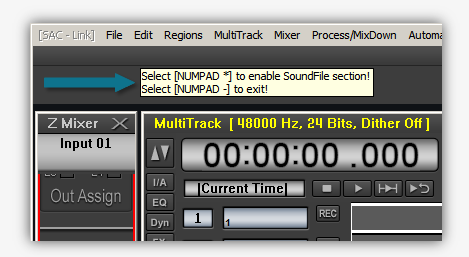
Notice the ToolTip text, namely:
Select [NUMPAD *] to enable SoundFile section!
Select [NUMPAD -] to exit!
Thus, via the NumberPad
[*] key then, these fifteen keystrokes are are now
narrowed down to one! This script will remain "
resident" until the NumberPad [-] key is activated - which in turn, exits the script.
In closing, I am discovering new-and-exciting means of employing|deploying AutoIt scripts in my everyday Session activities. If you have an interest in this script, please let me know.
If there happens to be a particular activity that you would like to "
make more efficient", then please let me know that as well!
* Please note: All of my scripts can be "
tailored" to meet the needs for your particular system requirements. All that is required is for me to to know precisely what those [/size]
requirements are.
Thank you for your time....appreciated!
[size=100]Good day,
Of the many menu opinion available within the SAWStudio environment, there is one in particular that I tend to access rather frequently, and that is the "Add Sound File To MT" menu option.
In total, there are a total of fifteen keystrokes that are required to access the "Add Sound File To MT" selection dialog. Granted, you DO get somewhat proficient at navigating these keystrokes, however, it might be more advantageous to employ "other" means. This is precisely what I have accomplished here.
For example, consider the following:
[/size][IMG]https://www.sentinelmusicstudios.com/ftp/rml_labs/images/AddSoundFile.png[/IMG][size=100]
Notice the ToolTip text, namely:
Select [NUMPAD *] to enable SoundFile section!
Select [NUMPAD -] to exit!
Thus, via the NumberPad
[*] key then, these fifteen keystrokes are are now [I]narrowed down to one![/I] This script will remain "[I]resident[/I]" until the NumberPad [-] key is activated - which in turn, exits the script.
In closing, I am discovering new-and-exciting means of employing|deploying AutoIt scripts in my everyday Session activities. If you have an interest in this script, please let me know.
If there happens to be a particular activity that you would like to "[I]make more efficient[/I]", then please let me know that as well!
* Please note: All of my scripts can be "[I]tailored[/I]" to meet the needs for your particular system requirements. All that is required is for me to to know precisely what those [/size][size=100]requirements [/size][size=100]are.
Thank you for your time....appreciated!
[/size]
