Page 1 of 1
SOT: Session Development Main Menu
Posted: Wed Oct 23, 2024 7:50 am
by mr_es335
Good day,
I hope that the day finds you well!
I have just completed another menu-based application entitled, "RML Labs Session Development Main Menu".
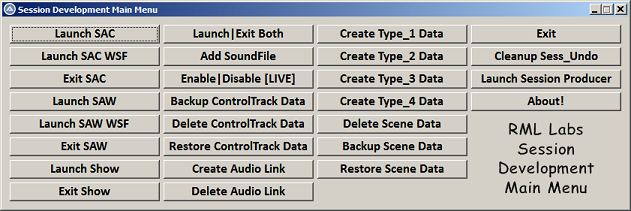 Further information on this application can be gleaned here: [Click_Me]
All of the various menu systems that I have developed 97 thus far], are all available on a donation basis to any-and-all interested parties.
* See sig for further information.
Thank you for your time...appreciated!
Re: SOT: Session Development Main Menu
Posted: Wed Oct 23, 2024 2:06 pm
by mr_es335
Good day,
After being a happy RML Labs "user" for the last 15 years...I am always amazed at just how "efficient" the software is!
In my particular situation, a control surface would prove to have no practicable benefit to my overall work flow.
Being what would be referred to as a "power user" [...not by any mental fortitude, might or skill...] ...simply by the fact the I employ the keyboard almost exclusively [60%70% of the time anyhow], with the remaining 30%-40% being divvied up with the employment of the mouse.
In those situations where it would simply be too cumbersome to employ either the keyboard or the mouser, then the Control Track can be deployed....in more ways than one!!!
"Wow..Wow!"...and... "Doublement waouh!" ...and... "Doppeltes Wow" ...and... "Doppio wow!" 'nuff said!!
PS: If you have have a scenario that could benefit from either scripts or menus...then please let me know. Love to help...if I am able!
Re: SOT: Session Development Main Menu UPDATE!!
Posted: Wed Nov 13, 2024 8:45 pm
by mr_es335
Good day,
I have completed a major update to Session Development Main Menu, which is now entitled, "Session|Show Development Main Menu".
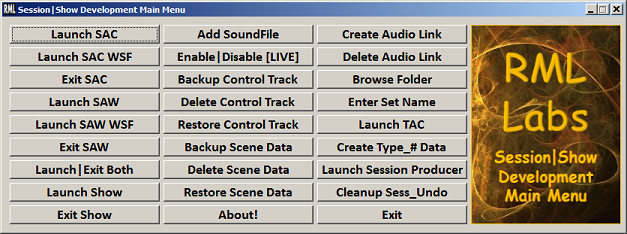 I have simplified many of the menu options and enhanced many of the background error-checking routines!
I particularly find the "Launch Show" and "Exit Show" options very handy indeed!
* The first, 1) minimizes the Task bar, 2) launches SAC with a Session data file, 3) enables "LIVE", 4) launches SAW with a Session file, 5) enables the F4 view, and finally, 6) launches the Show Control Options...prompting the use to select a Show Control data file.
* The second, 2) exits SAW, 2) exits SAC, and 3) restores the Task bar.
* Each of these "operations" is executed via a single selection of the appropriate Menu option!
Also, for those that employ SAW for "Backing Track" purposes, the "Create Type_# Data" option, reads a list of wave files and creates named-copies of that data.
* For example, I have two folders, \edl and \wav.
a) The \wav folder contains twenty data files
b) There is a data file entitled, "Type_1.edl" stored on the system
c) The above option, as noted, reads the contents of the \wav folder and stores that listing memory
d) Copies are then made of the Type_1.edl data file - one for each of the data files stored in the \wav folder.
e) Those copied-and-renamed Type_1.edl data file are then updated accordingly with the associated wave files.
* Note: All this,. in short, eliminates the needs to copy-and-paste the wave filenames of the copied Type_1.edl. A real time-saver.
Pretty slick...if I do not say so myself!!