

Good day,
I am seeking the assistance of someone familiar wit the SAC/SAW channel EQ and channel Compressor.
What I am hoping for is to have someone:
a) Introduce me the "basics" of the SAC|SAW EQ.
b) How to "visualize" the "parameters".
* For example, someone had noted that one of the elements of an EQ was akin to a "Q" setting.
c) Repeat the above with the SAC|SAW Compressor.
Please note, the EQ is the most important component for me at the moment.
My suggestion is that someone could "remote-in" to my system, and then demonstrates to me the "ins-and-outs" of these two components of SAC|SAW.
I have no issues with remuneration if that may be of any assistance.
Thank you for your time. Appreciated.
Assistance with EQ and Comp
Moderator: Bob L
Re: Assistance with EQ and Comp
Good day,
Here is what I have been able to "glean" thus far:
1) The current that I employ is the "Simple" shade by Brett.
* Brett has implemented different terms for the EQ labels - which kind of "threw-me-off" a bit.
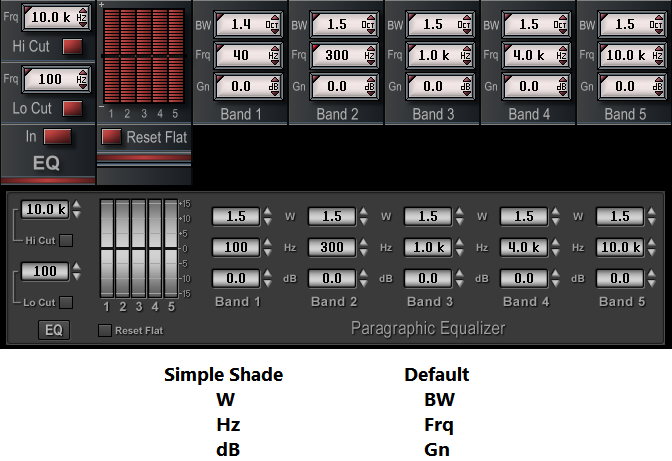
Simple Shade
W: BW
Hz: Frq
dB: Gn
Default
BW: Would this be the "Q"?
Frq: Frequency, obviously.
Gn: Gain, obviously.
Tutorials
#1: Parametric EQ Explained | Sound Advice
BW: Would this be the "Q"? [0.37]
Frq: Frequency [0.25]
Gn: Gain [0:14]
What is the purpose of "Q"
* I understand "what" Q does, what I need to know is "Why would you implement Q"?
#2: Parametric EQ vs Graphic EQ - What's the Difference?
* At 1:59
A: Choosing a specific frequency to tweak.
B: Gaining that frequency
* Boosting or cutting that frequency
C: Controlling the width (Q) of that boost (gain)
Would the following be an "acceptable" starting point?
Band 1: Low
Band 2: Low-Mid
Band 3: Mid
Band 4: High-Mid
Band 5: High
#3: How a Parametric EQ Works | Metalworks Institute
So, what is this explanation?
* Seems to "work" for me?
* Anything to add...remove?
Thank you for your time and your consideration to the above...all are very much appreciated!
Here is what I have been able to "glean" thus far:
1) The current that I employ is the "Simple" shade by Brett.
* Brett has implemented different terms for the EQ labels - which kind of "threw-me-off" a bit.
Simple Shade
W: BW
Hz: Frq
dB: Gn
Default
BW: Would this be the "Q"?
Frq: Frequency, obviously.
Gn: Gain, obviously.
Tutorials
#1: Parametric EQ Explained | Sound Advice
BW: Would this be the "Q"? [0.37]
Frq: Frequency [0.25]
Gn: Gain [0:14]
What is the purpose of "Q"
* I understand "what" Q does, what I need to know is "Why would you implement Q"?
#2: Parametric EQ vs Graphic EQ - What's the Difference?
* At 1:59
A: Choosing a specific frequency to tweak.
B: Gaining that frequency
* Boosting or cutting that frequency
C: Controlling the width (Q) of that boost (gain)
Would the following be an "acceptable" starting point?
Band 1: Low
Band 2: Low-Mid
Band 3: Mid
Band 4: High-Mid
Band 5: High
#3: How a Parametric EQ Works | Metalworks Institute
So, what is this explanation?
* Seems to "work" for me?
* Anything to add...remove?
Thank you for your time and your consideration to the above...all are very much appreciated!
Re: Assistance with EQ and Comp
Here is a good explanation of Q (Bandwidth). In an eq circuit the knob labeled Q or Bandwidth are functionally the same thing.
Bandwidth:
Definition:
Q, or quality factor, is a dimensionless parameter that describes the selectivity of a filter or resonance.
Relationship to Bandwidth:
Q is inversely proportional to bandwidth. A higher Q indicates a narrower bandwidth, and a lower Q indicates a wider bandwidth.
Impact on Sound:
In equalizers, Q determines how narrow or wide the "peak" or "dip" is when boosting or cutting frequencies.
Example:
A high Q setting on an equalizer will create a narrow, precise boost or cut, while a low Q setting will create a broader, more subtle effect.
Q-Factor of Resonance - Sine Vibration Testing - VRU
Bandwidth is the "how much" (how wide the frequency range is), and Q is the "how selective" (how narrow or wide the range is relative to the center frequency).
Analogy:
Imagine a flashlight beam. Bandwidth is like the width of the beam (how much area it covers), and Q is like the focus of the beam (how sharp or diffuse the edges are).
Bandwidth:
- Definition: Bandwidth is the width of the frequency range that an EQ filter affects.
- Measurement: It's typically measured in Hertz (Hz).
- Example: A filter with a bandwidth of 100 Hz centered at 1000 Hz will affect frequencies from 950 Hz to 1050 Hz.
- Relationship to Q: Bandwidth and Q are inversely related. A higher Q results in a narrower bandwidth, and a lower Q results in a wider bandwidth.
Definition:
Q, or quality factor, is a dimensionless parameter that describes the selectivity of a filter or resonance.
Relationship to Bandwidth:
Q is inversely proportional to bandwidth. A higher Q indicates a narrower bandwidth, and a lower Q indicates a wider bandwidth.
Impact on Sound:
In equalizers, Q determines how narrow or wide the "peak" or "dip" is when boosting or cutting frequencies.
Example:
A high Q setting on an equalizer will create a narrow, precise boost or cut, while a low Q setting will create a broader, more subtle effect.
Q-Factor of Resonance - Sine Vibration Testing - VRU
Bandwidth is the "how much" (how wide the frequency range is), and Q is the "how selective" (how narrow or wide the range is relative to the center frequency).
Analogy:
Imagine a flashlight beam. Bandwidth is like the width of the beam (how much area it covers), and Q is like the focus of the beam (how sharp or diffuse the edges are).
---------------------------------------
Philip G.
Philip G.
Re: Assistance with EQ and Comp
A graphic EQ is an tone filter with fixed frequencies and fixed bandwidths.
A parametric EQ is a tone filter with variable frequencies and variable bandwidth's
A graphic EQ can only adjust the tone of a signal at the fixed frequencies of each band, which is why you will see 31 band Graphic EQs. They need that many bands in order to have a band close to the frequency you are trying to adjust.
A Parametric EQ allows you to dial in the specific band (center frequency) and bandwidth/Q (how many frequencies above and below the selected center frequency are affected).
A parametric EQ is vastly more effective than a graphic EQ. Most EQ adjustments need to be made an arbitrary frequencies and a Graphic EQ can only make adjustments at the specific fixed bands.
As an example. You have a Tom drum that is ringing. With a graphic EQ in almost all cases the best you can do is find the two bands that are above and below the frequency of the ringing Tom Drum, and as you reduce the level of those bands you are also affecting everything else around those frequencies. With a 31band EQ that would be more than an octave of tone being affected.
With a Parametric EQ, you can dial in the exact frequency that is ringing, set a high Q (very narrow bandwidth) and remove just the specific offending tone.
A parametric EQ is a tone filter with variable frequencies and variable bandwidth's
A graphic EQ can only adjust the tone of a signal at the fixed frequencies of each band, which is why you will see 31 band Graphic EQs. They need that many bands in order to have a band close to the frequency you are trying to adjust.
A Parametric EQ allows you to dial in the specific band (center frequency) and bandwidth/Q (how many frequencies above and below the selected center frequency are affected).
A parametric EQ is vastly more effective than a graphic EQ. Most EQ adjustments need to be made an arbitrary frequencies and a Graphic EQ can only make adjustments at the specific fixed bands.
As an example. You have a Tom drum that is ringing. With a graphic EQ in almost all cases the best you can do is find the two bands that are above and below the frequency of the ringing Tom Drum, and as you reduce the level of those bands you are also affecting everything else around those frequencies. With a 31band EQ that would be more than an octave of tone being affected.
With a Parametric EQ, you can dial in the exact frequency that is ringing, set a high Q (very narrow bandwidth) and remove just the specific offending tone.
---------------------------------------
Philip G.
Philip G.
Re: Assistance with EQ and Comp
A graphic EQ is an tone filter with fixed frequencies and fixed bandwidths.
A parametric EQ is a tone filter with variable frequencies and variable bandwidth's
A graphic EQ can only adjust the tone of a signal at the fixed frequencies of each band, which is why you will see 31 band Graphic EQs. They need that many bands in order to have a band close to the frequency you are trying to adjust.
A Parametric EQ allows you to dial in the specific band (center frequency) and bandwidth/Q (how many frequencies above and below the selected center frequency are affected).
A parametric EQ is vastly more effective than a graphic EQ. Most EQ adjustments need to be made at arbitrary frequencies and a Graphic EQ can only make adjustments at the specific fixed bands and affect all of the frequencies around the specific band (up to the adjacent bands).
As an example. You have a Tom drum that is ringing. With a graphic EQ in almost all cases the best you can do is find the two bands that are above and below the frequency of the ringing Tom Drum, and as you reduce the level of those bands you are also affecting everything else around those frequencies. With a 31band EQ that would be more than an octave of tone being affected.
With a Parametric EQ, you can dial in the exact frequency that is ringing, set a high Q (very narrow bandwidth) and dampen just the specific offending tone.
A parametric EQ is a tone filter with variable frequencies and variable bandwidth's
A graphic EQ can only adjust the tone of a signal at the fixed frequencies of each band, which is why you will see 31 band Graphic EQs. They need that many bands in order to have a band close to the frequency you are trying to adjust.
A Parametric EQ allows you to dial in the specific band (center frequency) and bandwidth/Q (how many frequencies above and below the selected center frequency are affected).
A parametric EQ is vastly more effective than a graphic EQ. Most EQ adjustments need to be made at arbitrary frequencies and a Graphic EQ can only make adjustments at the specific fixed bands and affect all of the frequencies around the specific band (up to the adjacent bands).
As an example. You have a Tom drum that is ringing. With a graphic EQ in almost all cases the best you can do is find the two bands that are above and below the frequency of the ringing Tom Drum, and as you reduce the level of those bands you are also affecting everything else around those frequencies. With a 31band EQ that would be more than an octave of tone being affected.
With a Parametric EQ, you can dial in the exact frequency that is ringing, set a high Q (very narrow bandwidth) and dampen just the specific offending tone.
---------------------------------------
Philip G.
Philip G.
Re: Assistance with EQ and Comp
Philip,
Firstly...and as always...thanks for the follow-up...appreciated!
Secondly, I, and I do sincerely hope "others" appreciate you and your valuable input to this Forum?
Thirdly, your explanation of "Q" is succinct. What I do appreciate the most is that I am not able to "visualize" the various parameters in a similar manner as that of a "graphic" EQ...such as PRO-Q from FabFilter.
Lastly, your explanation of the comparative differences between a graphic EQ and a parametric EQ is also succinct.
Again, and as always, Philip, I do thank you for your time and your responses to my queries. Both are always very much appreciated!
Firstly...and as always...thanks for the follow-up...appreciated!
Secondly, I, and I do sincerely hope "others" appreciate you and your valuable input to this Forum?
Thirdly, your explanation of "Q" is succinct. What I do appreciate the most is that I am not able to "visualize" the various parameters in a similar manner as that of a "graphic" EQ...such as PRO-Q from FabFilter.
Lastly, your explanation of the comparative differences between a graphic EQ and a parametric EQ is also succinct.
Again, and as always, Philip, I do thank you for your time and your responses to my queries. Both are always very much appreciated!
Re: Assistance with EQ and Comp
Pro-Q has a very pretty interface, but you don't mix with your eyes. You need to mix with your ears. It really doesn't take that long to train your ears to hear the general frequencies and get a good sense of where things are off (100hz, 400hz, 2000hz, etc).
If you want a visual indication, patch one of the frequency analyzers on your master out, or better yet on the solo bus and you will get a very visual chart to show you the relative frequency ranges your system is producing.
I used to ring out stage monitors using a 3ch parametric EQ by setting the Q to max (super tight bandwidth), bringing the gain up and sweeping the frequency while listening for feedback (the system will feedback at the places where there are resonant frequencies). This was a really good way to remove the honk sound out of sub woofers, particularly in poorly treated reverberant rooms. No visual interface, just a knob and my ears. It's actually very fast.
I'm not saying a GUI like Pro-Q isn't nice, but it's really more glitter than substance. Its certainly could be a nice tool to teach somebody how to listen, but once you've crossed that threshold, the GUI doesn't add a lot to the table.
Everything that Pro-Q does to tone shape, can be done with the EQ already on the channel strip.
If you want a visual indication, patch one of the frequency analyzers on your master out, or better yet on the solo bus and you will get a very visual chart to show you the relative frequency ranges your system is producing.
I used to ring out stage monitors using a 3ch parametric EQ by setting the Q to max (super tight bandwidth), bringing the gain up and sweeping the frequency while listening for feedback (the system will feedback at the places where there are resonant frequencies). This was a really good way to remove the honk sound out of sub woofers, particularly in poorly treated reverberant rooms. No visual interface, just a knob and my ears. It's actually very fast.
I'm not saying a GUI like Pro-Q isn't nice, but it's really more glitter than substance. Its certainly could be a nice tool to teach somebody how to listen, but once you've crossed that threshold, the GUI doesn't add a lot to the table.
Everything that Pro-Q does to tone shape, can be done with the EQ already on the channel strip.
---------------------------------------
Philip G.
Philip G.
Re: Assistance with EQ and Comp
Philip,
You stated, "Everything that Pro-Q does to tone shape, can be done with the EQ already on the channel strip."
I really appreciate your comment, "...but you don't mix with your eyes. You need to mix with your ears". Absolutely wonderful point!
"....'nuff said..!"
Thanks, Philip!!
You stated, "Everything that Pro-Q does to tone shape, can be done with the EQ already on the channel strip."
I really appreciate your comment, "...but you don't mix with your eyes. You need to mix with your ears". Absolutely wonderful point!
"....'nuff said..!"
Thanks, Philip!!
Re: Assistance with EQ and Comp
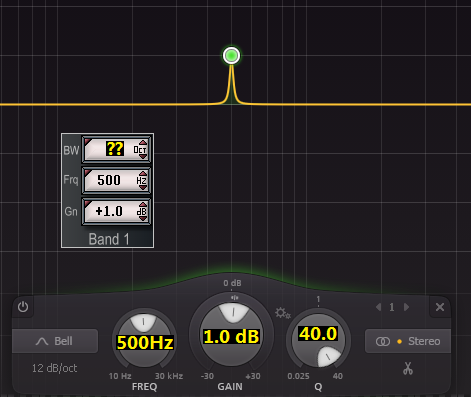
You could get visual feedback of how the eq settings work by putting a plugin like Voxengo's Span, or similar in the post effect insert. Then you could experiment all day long, while listening AND seeing.

Re: Assistance with EQ and Comp
download the SAC64 demo and look at the Touch Mixer View EQ... it draws the curves.
Bob L
Bob L
Re: Assistance with EQ and Comp
First of all, such equalization is of little use musically and creates phase problems.mr_es335 wrote:Good day,
How would the following be accomplished?
On the other hand, in SAC you can see the curves in the EQ of the Touch Mixer View. Although the equalizer in Touch View doesn't work smoothly for me and keeps getting stuck. That's why I never use it.
Re: Assistance with EQ and Comp
Bob,
You stated, "...download the SAC64 demo and look at the Touch Mixer View EQ... it draws the curves.."
Gosh! Thanks, Bob...for the suggestion. The Touch Mixer View EQ looks to be very useful - particularly, during the "early earning phases".
Always appreciated!
You stated, "...download the SAC64 demo and look at the Touch Mixer View EQ... it draws the curves.."
Gosh! Thanks, Bob...for the suggestion. The Touch Mixer View EQ looks to be very useful - particularly, during the "early earning phases".
Always appreciated!
-
Dave Labrecque

- Posts: 12796
- Joined: Mon May 24, 2004 12:00 pm
- Location: Becket, Massachusetts
- Has thanked: 17 times
- Been thanked: 15 times
Re: Assistance with EQ and Comp
I've never heard this before. I've always thought that bandwidth and Q are two ways of describing the same thing: the range of frequencies being impacted, which, in combination with the amount of gain (and the specific properties of the equalizer), determines the shape of the resulting boost or cut.cgrafx wrote:Imagine a flashlight beam. Bandwidth is like the width of the beam (how much area it covers), and Q is like the focus of the beam (how sharp or diffuse the edges are).
Could you elaborate about the sharp/diffuse bit of your analogy, Philip?
Dave "it aint the heat, it's the humidity" Labrecque
Becket, Massachusetts
Becket, Massachusetts
-
Dave Labrecque
- Posts: 12796
- Joined: Mon May 24, 2004 12:00 pm
- Location: Becket, Massachusetts
- Has thanked: 17 times
- Been thanked: 15 times
Re: Assistance with EQ and Comp
Hi Dell,
It strikes me that you're still not quite getting some of the details of this particular EQ parameter. Others have answered your specif question. I'll try to fill that out with the "why" aspect.
As has been said the W or width or bandwidth or Q setting determines the range of the boost (or cut) being applied. (note that shape is really a different property that emerges from a combination of the range, the gain, and the EQ's own character) This range can be described in terms of Hz (Hertz), i.e. the higher frequency minus the lower frequency (the difference); this can also be described by a Q (Quality Factor) number, i.e., typically, the center frequency divided by the bandwidth (the ratio of the former to the latter), or in the way Bob does it: the bandwidth (Bob calls it "Q") expressed in octaves of the center frequency. Note that the latter two approaches have the benefit of "accommodating" the moving target that the center frequency is for an audio engineer; width expressed in Hertz alone may be less useful as you hop around the audio spectrum with your EQ tools. A Q number or an octave number better address practical reality for people with ears. A boost or cut of 500 Hz bandwidth is a different thing at 400Hz than it is at 15KHz; whereas a Q of 0.8 (i.e. 1.4 octaves) would likely yield more-expected results as you move from one center frequency to the next. At least that's the idea, I think.
I know when I set up a de-esser using Bob's channel strip EQ, I find it intuitively useful to "back engineer" the range affected using specific Q octave settings. At a setting of 1: double the center for the top number and halve it for the bottom. Work from there. I really don't want to get too far below 3 or 4KHz if I can help it (lest the process audibly impact non-ess content). Even so, as has been said, use those ears!
Understanding that both Q and bandwidth in octaves each have a corresponding mathematical formula, I was going to figure out the relationship between the two and present the resulting equation. Then it occurred to me that AI could do that for me (if not a good, old-fashioned Google search). Boy am I glad I didn't try to take it on myself.

When I saw in a Q/octaves equivalence table that one octave is equal to a Q of about 1.414, I recognized what appeared to be the square root of two emerging. Right then I knew it was getting deeper than I'd anticipated.
I digress. Does this make any more intuitive sense to you?
It strikes me that you're still not quite getting some of the details of this particular EQ parameter. Others have answered your specif question. I'll try to fill that out with the "why" aspect.
As has been said the W or width or bandwidth or Q setting determines the range of the boost (or cut) being applied. (note that shape is really a different property that emerges from a combination of the range, the gain, and the EQ's own character) This range can be described in terms of Hz (Hertz), i.e. the higher frequency minus the lower frequency (the difference); this can also be described by a Q (Quality Factor) number, i.e., typically, the center frequency divided by the bandwidth (the ratio of the former to the latter), or in the way Bob does it: the bandwidth (Bob calls it "Q") expressed in octaves of the center frequency. Note that the latter two approaches have the benefit of "accommodating" the moving target that the center frequency is for an audio engineer; width expressed in Hertz alone may be less useful as you hop around the audio spectrum with your EQ tools. A Q number or an octave number better address practical reality for people with ears. A boost or cut of 500 Hz bandwidth is a different thing at 400Hz than it is at 15KHz; whereas a Q of 0.8 (i.e. 1.4 octaves) would likely yield more-expected results as you move from one center frequency to the next. At least that's the idea, I think.
I know when I set up a de-esser using Bob's channel strip EQ, I find it intuitively useful to "back engineer" the range affected using specific Q octave settings. At a setting of 1: double the center for the top number and halve it for the bottom. Work from there. I really don't want to get too far below 3 or 4KHz if I can help it (lest the process audibly impact non-ess content). Even so, as has been said, use those ears!
Understanding that both Q and bandwidth in octaves each have a corresponding mathematical formula, I was going to figure out the relationship between the two and present the resulting equation. Then it occurred to me that AI could do that for me (if not a good, old-fashioned Google search). Boy am I glad I didn't try to take it on myself.
When I saw in a Q/octaves equivalence table that one octave is equal to a Q of about 1.414, I recognized what appeared to be the square root of two emerging. Right then I knew it was getting deeper than I'd anticipated.
I digress. Does this make any more intuitive sense to you?
Dave "it aint the heat, it's the humidity" Labrecque
Becket, Massachusetts
Becket, Massachusetts
Re: Assistance with EQ and Comp
My response was copy pasted from a google search. I should have pulled that sentence out of the reply as it's not a very good analogy.Dave Labrecque wrote:I've never heard this before. I've always thought that bandwidth and Q are two ways of describing the same thing: the range of frequencies being impacted, which, in combination with the amount of gain (and the specific properties of the equalizer), determines the shape of the resulting boost or cut.
Could you elaborate about the sharp/diffuse bit of your analogy, Philip?
Bandwidth and Q are inversely related and for the purpose of an end user turning a (virtual) knob tune/affect the same part of the filter - controlling how broad or narrow the filter is around the center frequency.
Frequency - The center frequency at which the filter band is active. A peak filter will also affect frequencies directly adjacent, depending on the shape of the filter. Gain - by how much the affected area is boosted or reduced.
Quality (Q) - Is a mathematical way of describing the shape of the filter. High q-values mean that the filter only affects a very narrow band. Low q-values mean that many frequencies above and below the center frequency are also affected by the filter.
Bandwidth BW / Slope S - Is the same as Q, but expressed in a different way. Some parametric EQ's let you adjust a Q-value, others let you adjust a Bandwidth-value. They both describe the same thing, just expressed in different ways. High Bandwidth = low Q, Low Bandwidth = high Q.
---------------------------------------
Philip G.
Philip G.
-
Dave Labrecque
- Posts: 12796
- Joined: Mon May 24, 2004 12:00 pm
- Location: Becket, Massachusetts
- Has thanked: 17 times
- Been thanked: 15 times
Re: Assistance with EQ and Comp
Gotcha. Okay, that's what I'd always assumed.
Thanks.
Thanks.
Dave "it aint the heat, it's the humidity" Labrecque
Becket, Massachusetts
Becket, Massachusetts