New Forum!

Post a reply

Confirmation code
Enter the code exactly as it appears. All letters are case insensitive.
Smilies
:D :) :o :? :( ;) :geek: :ugeek: :cool: :eek: :mad: :p :rolleyes: :cry: :lol: :twisted: :evil: :!: :?: :idea: :arrow: :| :mrgreen: :oops:

BBCode is ON
[img] is ON
[url] is ON
Smilies are ON

Topic review
   

Expand view Topic review: New Forum!

Re: New Forum!

by Todd R » Mon Jun 01, 2026 7:13 am

Thanks to Jeanne for all the hard work!

I finally figured out how to get the syntax correct on my username (duh!) Maybe I can switch to my typical UN and it will propagate to all my old posts? I'll try it...

nope, I can't change UN, that's fine...I think I understand why

Re: New Forum!

by Macay » Wed May 27, 2026 10:54 am

I would also recommend checking your notification settings at User Control Panel > Board preferences Edit > notification options

Re: New Forum!

by Jeanne Quinn » Wed May 27, 2026 10:28 am

Quick tip: if you go into your User Control Panel | Board Preferences | Edit Display Options and change "Post order display direction" to Descending, any topic/thread you go into will show the most current reply at the top, so you don't need to navigate to the bottom of the last page. I believe the default setting is "Ascending." Personal preference, but I'm used to reading long email threads from newest to oldest, so it feels natural to me here as well. ;)

Re: New Forum!

by Macay » Wed May 27, 2026 10:25 am

Jeanne Quinn wrote: Wed May 27, 2026 10:15 am Thank you! Take a look now. The old forum links should successfully redirect to the new forum urls. :) Here is the thread you referenced earlier: viewtopic.php?p=225801
Wow, you're a magician. And a quick one! :)

Re: New Forum!

by Jeanne Quinn » Wed May 27, 2026 10:15 am

Macay wrote: Wed May 27, 2026 10:10 am No need to hurry IMO! :)
Thank you! Take a look now. The old forum links should successfully redirect to the new forum urls. :) Here is the thread you referenced earlier: viewtopic.php?p=225801

Re: New Forum!

by Macay » Wed May 27, 2026 10:10 am

Jeanne Quinn wrote: Wed May 27, 2026 9:50 am I'll try to take a look at this today!
No need to hurry IMO! :)

Re: New Forum!

by Jeanne Quinn » Wed May 27, 2026 9:50 am

Macay wrote: Wed May 27, 2026 9:12 am Any chance to fix the broken links? Do you have a mapping of the old post IDs to the new IDs?
Oh! Thank you for the reminder!! The new forum uses completely different topic IDs and URL structures, but I'll check to see if I can create some type of automatic redirect from the old URLs to the new forum topics! I'll try to take a look at this today!

Re: New Forum!

by Macay » Wed May 27, 2026 9:12 am

Thanks again, Jeanne! My favorite so far is "we_clearblue". It looks quite nice and has a direct link to the "Active topics", so no need to find that link in a dropdown menu. :) And I just noticed that the smilies look better on a light background as well. :D

Any chance to fix the broken links? Do you have a mapping of the old post IDs to the new IDs?

Re: New Forum!

by Jeanne Quinn » Wed May 27, 2026 5:59 am

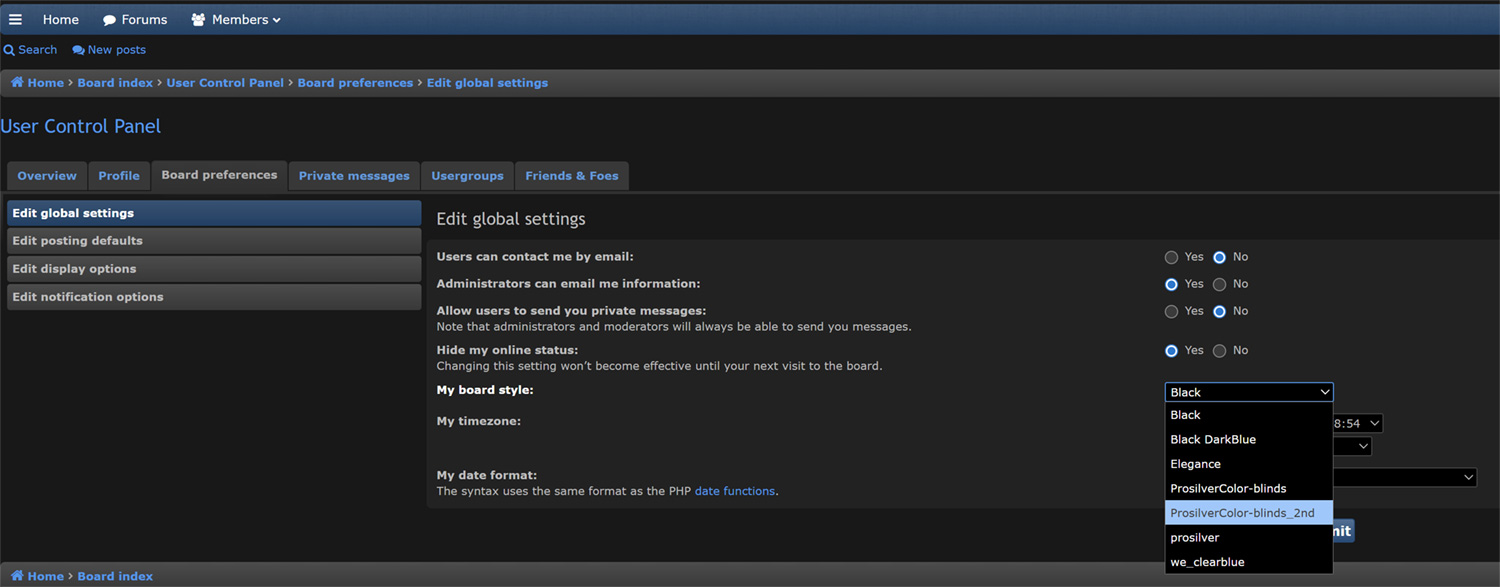
Thank you for the feedback on the style settings! I can appreciate that the forum font sizes and colors may not be to everyone's liking! I have turned off the override on the default style, so you will now find a setting in your control panel to select a different board style! I suggest the ProSilverColor-blinds_2nd which is a nicely done light background with dark fonts. Note that once you change your default style, the layout and location of various settings will be different, but I'm sure you'll figure it out! ;) Here's where to locate the setting! Also, there is no direct way to control font sizes without manipulating your browser window, but I was able to hunt down a style sheet on the server and bump it up a notch there! :geek:

See if that helps!
-Jeanne

Attachments
board_settings.jpg
board_settings.jpg (129.15 KiB) Viewed 1627 times

Re: New Forum!

by Macay » Tue May 26, 2026 9:50 am

I too find some text not that easy on the eyes, like the blue (or red) text on the dark background (due to the bad contrast). Since the old forum had it reversed (dark text on light background), some posts contain colored text that is even harder to read as in this one for example: viewtopic.php?p=225801
It would be great if we could chose between several themes. Not sure if that is possible with phpBB? Another option might be a theme with both light and dark mode.

I also noticed that links to forum posts are broken. See the above thread.

Re: New Forum!

by jmh » Mon May 25, 2026 6:07 am

Yikes! Migrations and database recovery at the same time.

Searching through old threads a great resource. My thanks to Jeanne too...

____________

On the trivia side - and to put on the list of possible adjustments in case other users are impacted: (I currently use a mac air for the forum, so it may apply just to my machine - or eyes.)
  • I find the default font a notch too small.
  • Some of the reds on charcoal (for unread threads and usernames) are difficult to read.
It looks like these are admin settings. If it turns out to be user adjustments, my apologies.

Re: New Forum!

by Dave Labrecque » Sun May 24, 2026 6:04 pm

Jeanne Quinn wrote: Sun May 24, 2026 11:55 am
Dave Labrecque wrote: Sun May 24, 2026 6:21 am I don't see a way to set the display to show subthreads (so it's clear which post is being responded to with each new post) like with the old interface (threaded/linear/hybrid modes). Have you seen such a setting?
Unfortunately, phpBB does not offer a native threaded or nested view. You'll probably need to rely more on quoting the response you're replying to. Their board says, "developers maintain that a threaded layout creates a distracting and unnatural user experience." :rolleyes:
LOL. I figured. Well, let's see if this old dog can learn a new trick. :lol:

Re: New Forum!

by MMP » Sun May 24, 2026 2:00 pm

Works now. Thanks!
IMG_0576.jpeg
IMG_0576.jpeg (80.11 KiB) Viewed 1749 times

Re: New Forum!

by Jeanne Quinn » Sun May 24, 2026 1:47 pm

Okay, I think I got it now. Can you try again?

Re: New Forum!

by MMP » Sun May 24, 2026 1:39 pm

I am not seeing an attachment link.

Re: New Forum!

by Jeanne Quinn » Sun May 24, 2026 1:21 pm

cgrafx wrote: Sun May 24, 2026 1:07 pm I'm not seeing the attachments tab - I assuming it should be located where the "Options" tab is below the (Save, Preview, Submit) buttons are?
Give that a whirl and see if you see it now! :)

Re: New Forum!

by cgrafx » Sun May 24, 2026 1:07 pm

Jeanne Quinn wrote: Sun May 24, 2026 12:00 pm As you're posting a reply, you should see an Attachments tab! I'm testing it here to see if it works. I'm selecting the "Place Inline" option as well. site_logo.png
Let me know if that works for you!
Hi Jeanne,

I'm not seeing the attachments tab - I assuming it should be located where the "Options" tab is below the (Save, Preview, Submit) buttons are?

Re: New Forum!

by Jeanne Quinn » Sun May 24, 2026 12:00 pm

cgrafx wrote: Sun May 24, 2026 2:16 am Hey Jeanne, one more option that would be nice to have turned back on is attachments. They don't have to be huge, but would be nice to be able to include jpegs/png for things like screen shots.

thanks once again for all of your hard work and effort to get the forum back up and running.
As you're posting a reply, you should see an Attachments tab! I'm testing it here to see if it works. I'm selecting the "Place Inline" option as well.
site_logo.png
site_logo.png (5.35 KiB) Viewed 1765 times
Let me know if that works for you!

Re: New Forum!

by Jeanne Quinn » Sun May 24, 2026 11:55 am

Dave Labrecque wrote: Sun May 24, 2026 6:21 am I don't see a way to set the display to show subthreads (so it's clear which post is being responded to with each new post) like with the old interface (threaded/linear/hybrid modes). Have you seen such a setting?
Unfortunately, phpBB does not offer a native threaded or nested view. You'll probably need to rely more on quoting the response you're replying to. Their board says, "developers maintain that a threaded layout creates a distracting and unnatural user experience." :rolleyes:

Re: New Forum!

by Jeanne Quinn » Sun May 24, 2026 11:49 am

Dave Labrecque wrote: Sat May 23, 2026 7:11 pm Hey, just noticing that while my signature has survived the site migration, it's not appearing in my posts. Maybe there's a switch for that in the backend somewhere? :?:
Okay! The forum has signatures turned on by default, but I found out you'll need to go into your User control panel (little person icon in the upper right), Board preferences | Edit posting defaults. There you'll turn on "Attach my signature by default." Testing here to make sure it works! :) Alternatively, if you want to choose which posts to attach your signature to, leave this setting set to no, and inside of your post before you click Submit, you'll see an Options tab with a checkbox to "Attach a signature."

Here goes nothin'! ;)

P.S. I see you already found it! Thanks for posting the solution. :)

Top