

Good day,
I have an HDSP 9632 with the various "break-out" cables, the BO9632CMKH and the BO9632.
I have viewed all of the available "TotalMix FX for Beginners" videos, sadly, to no avail.
Also, most of the instructional material that I have found thus far is simply "way above" my head.
What I am requiring, is for someone in RML Land to assist me in comprehending the inner-workings of TotalMixFX.
I am more-than-willing to compensate such for their time.
Thank you for your consideration.
SOT: RME TotalMix Assistance
Moderator: Bob L
Re: SOT: RME TotalMix Assistance
Hi Dell,
what specifically are you wanting to know?
If your using the RME card with SAW/SAC there really isn't anything complicated to do. The default setting startup setting should already map 1:1 inputs and outputs so they show up in SAW/SAC when you use the ASIO driver.
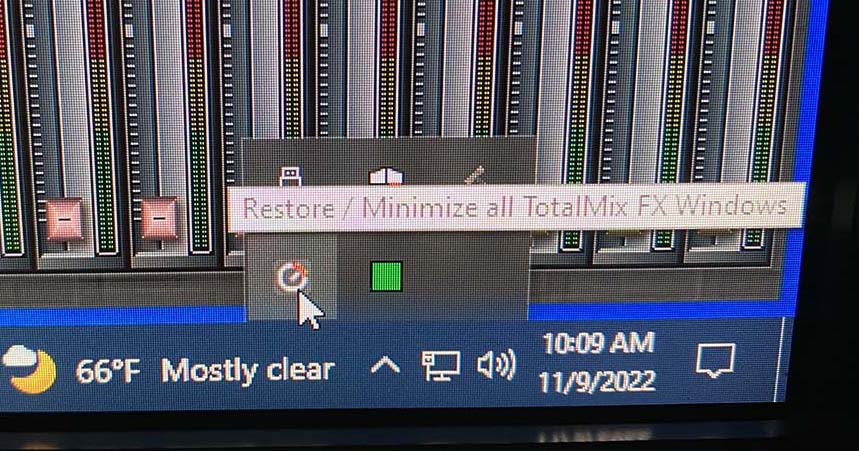
If for some reason the default setup is not configured properly, you can launch the TotalMix dashboard from the tray in the windows footer and select SnapShot or Setting 1.

what specifically are you wanting to know?
If your using the RME card with SAW/SAC there really isn't anything complicated to do. The default setting startup setting should already map 1:1 inputs and outputs so they show up in SAW/SAC when you use the ASIO driver.
If for some reason the default setup is not configured properly, you can launch the TotalMix dashboard from the tray in the windows footer and select SnapShot or Setting 1.
---------------------------------------
Philip G.
Philip G.
Re: SOT: RME TotalMix Assistance
Good day,
For example:
1. The HDSP 9632 is touted as a 32-Channel PCI Card with Multi-Format I/O.
2. The 1:1 configuration is "apprently" for earier versions of TotalMix.
3. I understand that there are three layers to TotalMixFX
Questions:
1. Where is the Analog 1/2 coming to/from?
2. Where is the Main going to?
4. Where are headphone connections?
The above are just a few of my concerns.
PS: It is absolute imperative that the following two points are understood - the first which I do tend to find somewhat egregious:
For example:
1. The HDSP 9632 is touted as a 32-Channel PCI Card with Multi-Format I/O.
- However, I can only ascertain 24 channels. Where are the other eight.
- On-board: 16xADAT
- Via the BO9632CMKH: 2xLine, 2xMIDI, 1xPhones
- Via the BO9632: 2x SPDIF
- So, 16+2+2+2+2=24. Where are the "other" 8 channels?
2. The 1:1 configuration is "apprently" for earier versions of TotalMix.
- I do not see this 1:1 occurring with the newer versions, such as 1.78.
3. I understand that there are three layers to TotalMixFX
- Layer 1: The Hardware Inputs - Has Analog 1/2, SPDIF, ADAT 1/2, ADAT 3/4, ADAT 5/6, and ADAT 7/8
- Layer 2: The Software Playback - Has Analog 1/2, SPDIF, ADAT 1/2, ADAT 3/4, ADAT 5/6, and ADAT 7/8
- Layer 3: The Hardware Outputs - Has SPDIF, ADAT 1/2, ADAT 3/4, ADAT 5/6, ADAT 7/8 and Main
Questions:
1. Where is the Analog 1/2 coming to/from?
2. Where is the Main going to?
4. Where are headphone connections?
The above are just a few of my concerns.
PS: It is absolute imperative that the following two points are understood - the first which I do tend to find somewhat egregious:
- First, Aumptive teaching - wherein the instructor assumes that the student knows something when in fact, the student does not, and
- Second, I am an extremely visual learner.
- So, it is c) that I have difficulty in comprehending.
Re: SOT: RME TotalMix Assistance
Good day,
Some things that I have gleaned:
From page 47 of the HDSP9632 User Manual: "Channels 11/12 of the HDSP 9632 are also available via an 1/4" TRS jack (stereo output)"
From a query: "What I want to do is pretty simple: having two output channels, one for the main output (analog), and one only for the headphones (spdif), so I can adjust the volume precisely in my phones. (I am speaking of the phones output of the hdsp9632, which can only be set to 0 / 6 / 12 db in the audiocard hamerfall properties). I'v watched the tutorials around but still can't get the solution."
Responses
Yes, phones out always has the same signal as main outs (on the HDSP 9632 only).
There is no way to separate the built-in headphones output on the 9632 card from the main analog outs, this card only has a stereo DA, sent to both main outs and phones.
Question
Again, where are channels 11/12 of the HDSP 9632 viewable in TotalMixFX?
Here is my present configuration for TotalMixFX: [Click_Me]
Some things that I have gleaned:
From page 47 of the HDSP9632 User Manual: "Channels 11/12 of the HDSP 9632 are also available via an 1/4" TRS jack (stereo output)"
From a query: "What I want to do is pretty simple: having two output channels, one for the main output (analog), and one only for the headphones (spdif), so I can adjust the volume precisely in my phones. (I am speaking of the phones output of the hdsp9632, which can only be set to 0 / 6 / 12 db in the audiocard hamerfall properties). I'v watched the tutorials around but still can't get the solution."
Responses
Yes, phones out always has the same signal as main outs (on the HDSP 9632 only).
There is no way to separate the built-in headphones output on the 9632 card from the main analog outs, this card only has a stereo DA, sent to both main outs and phones.
Question
Again, where are channels 11/12 of the HDSP 9632 viewable in TotalMixFX?
Here is my present configuration for TotalMixFX: [Click_Me]


Re: SOT: RME TotalMix Assistance
Oh man! Dell, I have found Total Mix to be a total pain
very confusing software IMO
I have a UFX+ and I swear there is a missing page in the manual.
RME guys don't really have a use case to help us users out
I do usually have it in FREE mode
In my research I have determined you need to set up a bunch scenes and then the mutes and solos work
this will take lots of time, so I don't get into it
The first, most important thing to understand is the HARDWARE input metering is like PFL; meters will always light/dance if there is signal feeding those channels
Second thing is to use the Matrix page
anyway, good luck....I don't have much advice beyond that
very confusing software IMO
I have a UFX+ and I swear there is a missing page in the manual.
RME guys don't really have a use case to help us users out
I do usually have it in FREE mode
In my research I have determined you need to set up a bunch scenes and then the mutes and solos work
this will take lots of time, so I don't get into it
The first, most important thing to understand is the HARDWARE input metering is like PFL; meters will always light/dance if there is signal feeding those channels
Second thing is to use the Matrix page
anyway, good luck....I don't have much advice beyond that
i7 8700K| ASRock Z370 Fatal1ty| 64GB Corsair Vengeance LED DDR4-3000| Palit GeForce 1050ti KalmX| RME UFX+| Win10 Pro (22H2) | SawStudio64| SpectraLayers 12| Cubase 15| Reason 12| Drawmer MC2.1| Adam A7X| Avantone MixCubes|
Re: SOT: RME TotalMix Assistance
Options>Channel Layout>Outputs Tab>investigate Hide status for those channels by left-clk which will highlight the channel and activate "Hide Channel In" sub-panel for whatever channel is highlightedmr_es335 wrote:
Question
Again, where are channels 11/12 of the HDSP 9632 viewable in TotalMixFX?
Here is my present configuration for TotalMixFX: [Click_Me]
is that what you mean?
I use a Drawmer MC2.1 Monitor Controller which just takes the main output feed and I don't use the UFX+ headphones jacks