

Good day,
I have discovered a way-and-means of being able to programmatically configure F-Key views!
Hhhhmmmm....
Programatically Configure F-Key Views
Moderator: Bob L
Re: Programatically Configure F-Key Views
Good day,
As I noted, it is now entirely possible for you to configure all of your F-Keys programmatically!!! Here is the completed script:
; -----------------------------------------------
; PositioningViewsF12
; Status: Working
; Date: 7:47 AM 11/1/2025
; -----------------------------------------------
PositioningViews()
; -----------------------------------------------
Func PositioningViews()
ActivateMain()
ZMixer()
Scenes()
FXChoices()
FXPrePatches()
FMixer()
StoreView()
SaveView()
EndFunc ;==>PositioningViews
; -----------------------------------------------
Func ActivateMain()
Local $hSAC_MAIN = WinActivate("[CLASS:SAC_MAIN]")
EndFunc ;==>ActivateMain
; -----------------------------------------------
Func ZMixer()
Local $iTimeOut = 250
Local $hSAC_ZOOMMIXER = "[CLASS:SAC_ZOOMMIXER]"
; -----------------------------------------------
; (1) Display the view
Send("{ALTDOWN}")
Send("{ALTUP}")
Send("V")
Send("Z")
; (2) Position the view
WinMove($hSAC_ZOOMMIXER, "", 5, 80, 103, 970)
EndFunc ;==>ZMixer
; -----------------------------------------------
Func Scenes()
Local $iTimeOut = 100
Local $hSAC_SCENES = "[CLASS:SAC_SCENES]"
; -----------------------------------------------
; (1) Display the view
Send("{ALTDOWN}")
Send("{ALTUP}")
Send("V")
Send("1")
; (2) Position the view
WinMove($hSAC_SCENES, "", 113, 80, 356, 453)
EndFunc ;==>Scenes
; -----------------------------------------------
Func FXChoices()
Local $iTimeOut = 100
Local $hSAC_FXCHOICES = "[CLASS:SAC_FXCHOICES]"
; -----------------------------------------------
; (1) Display the view
Send("{ALTDOWN}")
Send("{ALTUP}")
Send("V")
Send("C")
; (2) Position the view
WinMove($hSAC_FXCHOICES, "", 113, 535, 356, 240)
EndFunc ;==>FXChoices
; -----------------------------------------------
Func FXPrePatches()
Local $iTimeOut = 100
Local $hSAC_FXPREPATCHES = "[CLASS:SAC_FXPREPATCHES]"
; -----------------------------------------------
; (1) Display the view
Send("{ALTDOWN}")
Send("{ALTUP}")
Send("V")
Send("E")
; (2) Position the view
WinMove($hSAC_FXPREPATCHES, "", 113, 780, 356, 150)
EndFunc ;==>FXPrePatches
; -----------------------------------------------
Func FMixer()
Local $iTimeOut = 100
Local $hSAC_FULLMIXER = "[CLASS:SAC_FULLMIXER]"
; -----------------------------------------------
; (1) Display the view
Send("{ALTDOWN}")
Send("{ALTUP}")
Send("V")
Send("F")
; (2) Position the view
WinMove($hSAC_FULLMIXER, "", 474, 80, 240, 648)
EndFunc ;==>FMixer
; -----------------------------------------------
Func StoreView()
Sleep(500)
Send("{LSHIFT}+{F12}")
Send("{ENTER}")
EndFunc ;==>FMixer
; -----------------------------------------------
Func SaveView()
Sleep(500)
Send("{ALTDOWN}")
Send("{ALTUP}")
Send("F+F")
Send("{UP}+{UP}")
Send("{ENTER}+{ENTER}")
EndFunc ;==>FMixer
; -----------------------------------------------
If you are at all interested, email me, and I can send you a compiled version for your own perusal.
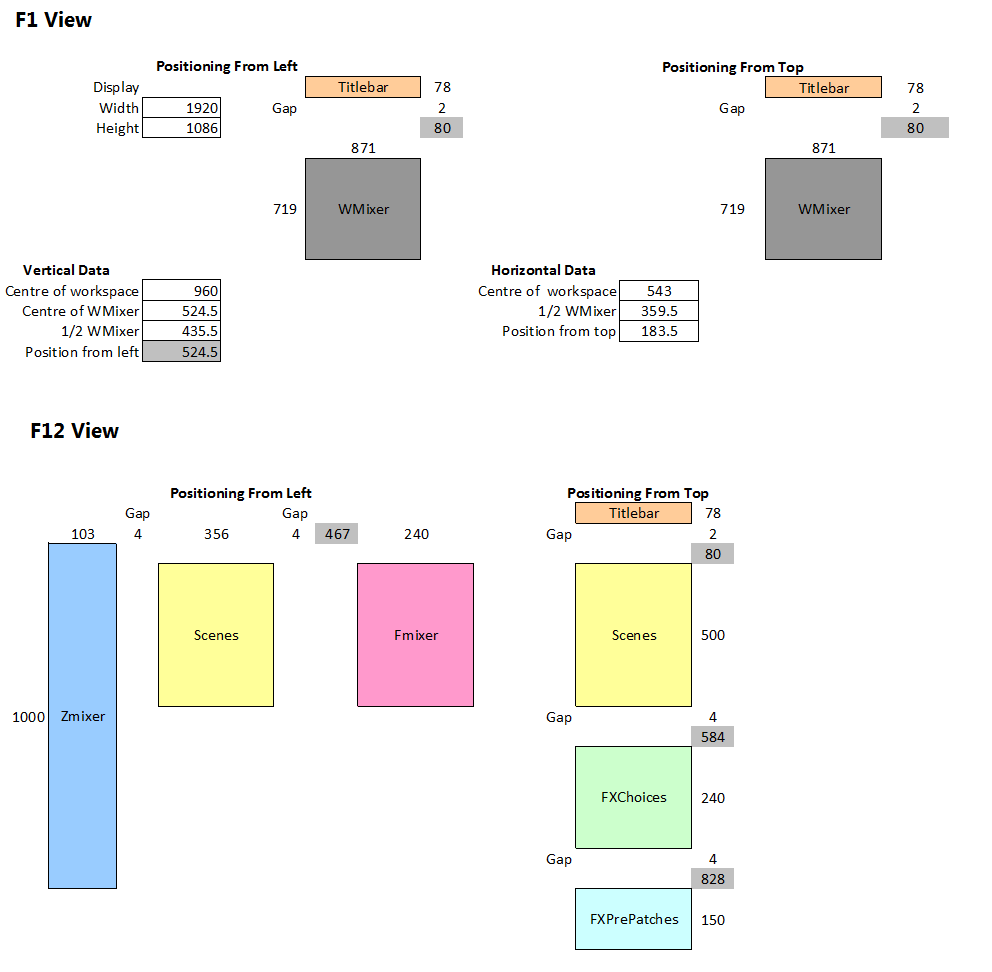
At present, I am compiling the data for determining precise placement of all of the various views based on default sizings [x [TOP], y [LEFT], h [HEIGHT], w [WIDTH].
Once such data has been determined and then provided, I can then place these views in the workspace at the given co-ordinates.
Interestingly, the script took me about 2 hours to produce, but now that the script is completed, the above script created the F12 view in under 2 seconds. Thus, 12 views would take a total of 24-30 seconds to complete!
And, by-the-way, we are referring to 0.5 pixel accuracy here!!
Update!!
Completing the "math", I was able to create 9 views [F1] to [F6] , [F10] to [F12] - all without having to launch SAC - with the entire layout being completed on paper!!
* PS: I do hope that "ya'all" realize that this script would also work with SAW!!!
As I noted, it is now entirely possible for you to configure all of your F-Keys programmatically!!! Here is the completed script:
; -----------------------------------------------
; PositioningViewsF12
; Status: Working
; Date: 7:47 AM 11/1/2025
; -----------------------------------------------
PositioningViews()
; -----------------------------------------------
Func PositioningViews()
ActivateMain()
ZMixer()
Scenes()
FXChoices()
FXPrePatches()
FMixer()
StoreView()
SaveView()
EndFunc ;==>PositioningViews
; -----------------------------------------------
Func ActivateMain()
Local $hSAC_MAIN = WinActivate("[CLASS:SAC_MAIN]")
EndFunc ;==>ActivateMain
; -----------------------------------------------
Func ZMixer()
Local $iTimeOut = 250
Local $hSAC_ZOOMMIXER = "[CLASS:SAC_ZOOMMIXER]"
; -----------------------------------------------
; (1) Display the view
Send("{ALTDOWN}")
Send("{ALTUP}")
Send("V")
Send("Z")
; (2) Position the view
WinMove($hSAC_ZOOMMIXER, "", 5, 80, 103, 970)
EndFunc ;==>ZMixer
; -----------------------------------------------
Func Scenes()
Local $iTimeOut = 100
Local $hSAC_SCENES = "[CLASS:SAC_SCENES]"
; -----------------------------------------------
; (1) Display the view
Send("{ALTDOWN}")
Send("{ALTUP}")
Send("V")
Send("1")
; (2) Position the view
WinMove($hSAC_SCENES, "", 113, 80, 356, 453)
EndFunc ;==>Scenes
; -----------------------------------------------
Func FXChoices()
Local $iTimeOut = 100
Local $hSAC_FXCHOICES = "[CLASS:SAC_FXCHOICES]"
; -----------------------------------------------
; (1) Display the view
Send("{ALTDOWN}")
Send("{ALTUP}")
Send("V")
Send("C")
; (2) Position the view
WinMove($hSAC_FXCHOICES, "", 113, 535, 356, 240)
EndFunc ;==>FXChoices
; -----------------------------------------------
Func FXPrePatches()
Local $iTimeOut = 100
Local $hSAC_FXPREPATCHES = "[CLASS:SAC_FXPREPATCHES]"
; -----------------------------------------------
; (1) Display the view
Send("{ALTDOWN}")
Send("{ALTUP}")
Send("V")
Send("E")
; (2) Position the view
WinMove($hSAC_FXPREPATCHES, "", 113, 780, 356, 150)
EndFunc ;==>FXPrePatches
; -----------------------------------------------
Func FMixer()
Local $iTimeOut = 100
Local $hSAC_FULLMIXER = "[CLASS:SAC_FULLMIXER]"
; -----------------------------------------------
; (1) Display the view
Send("{ALTDOWN}")
Send("{ALTUP}")
Send("V")
Send("F")
; (2) Position the view
WinMove($hSAC_FULLMIXER, "", 474, 80, 240, 648)
EndFunc ;==>FMixer
; -----------------------------------------------
Func StoreView()
Sleep(500)
Send("{LSHIFT}+{F12}")
Send("{ENTER}")
EndFunc ;==>FMixer
; -----------------------------------------------
Func SaveView()
Sleep(500)
Send("{ALTDOWN}")
Send("{ALTUP}")
Send("F+F")
Send("{UP}+{UP}")
Send("{ENTER}+{ENTER}")
EndFunc ;==>FMixer
; -----------------------------------------------
If you are at all interested, email me, and I can send you a compiled version for your own perusal.
At present, I am compiling the data for determining precise placement of all of the various views based on default sizings [x [TOP], y [LEFT], h [HEIGHT], w [WIDTH].
Once such data has been determined and then provided, I can then place these views in the workspace at the given co-ordinates.
Interestingly, the script took me about 2 hours to produce, but now that the script is completed, the above script created the F12 view in under 2 seconds. Thus, 12 views would take a total of 24-30 seconds to complete!
And, by-the-way, we are referring to 0.5 pixel accuracy here!!
Update!!
Completing the "math", I was able to create 9 views [F1] to [F6] , [F10] to [F12] - all without having to launch SAC - with the entire layout being completed on paper!!
* PS: I do hope that "ya'all" realize that this script would also work with SAW!!!
-
Dave Labrecque

- Posts: 12796
- Joined: Mon May 24, 2004 12:00 pm
- Location: Becket, Massachusetts
- Has thanked: 15 times
- Been thanked: 15 times
Re: Programatically Configure F-Key Views
Sorry to be so dense, Dell. What does programmatically mean in this context? What have you achieved here? How has my SAW world been enhanced? :confused:
Dave "it aint the heat, it's the humidity" Labrecque
Becket, Massachusetts
Becket, Massachusetts
Re: Programatically Configure F-Key Views
Dave,
You stated, "Sorry to be so dense, Dell. What does programmatically mean...?"
It is not that you are "dense" in any manner whatsoever, Dave. It is simply the fact that I really should have been more explicit!
Firstly, "programmatically" - from the term "programmatic" - simply means, "pertaining to, or of the nature of, a program".
When I am configuring SAC [...or SAW for that matter...], I select-and-drag, the various "views" to their respective locations - indeed as we ALL have done!!
Depending on the monitor's "Display Resolution" - this resolution defines the width and the height [...in pixel, or px...] of what we are able to view on that display resolution at any particular time. The two most common display resolutions at present are 1920 x 1080 and 2560 x 1600. We will focus on the display resolution of 1920 x 1080 for this response - as the display resolution of 1920 x 1080 is the more common display resolution at present.
Employing a display resolution of 1920 x 1080, I
You stated, "Sorry to be so dense, Dell. What does programmatically mean...?"
It is not that you are "dense" in any manner whatsoever, Dave. It is simply the fact that I really should have been more explicit!
Firstly, "programmatically" - from the term "programmatic" - simply means, "pertaining to, or of the nature of, a program".
When I am configuring SAC [...or SAW for that matter...], I select-and-drag, the various "views" to their respective locations - indeed as we ALL have done!!
Depending on the monitor's "Display Resolution" - this resolution defines the width and the height [...in pixel, or px...] of what we are able to view on that display resolution at any particular time. The two most common display resolutions at present are 1920 x 1080 and 2560 x 1600. We will focus on the display resolution of 1920 x 1080 for this response - as the display resolution of 1920 x 1080 is the more common display resolution at present.
Employing a display resolution of 1920 x 1080, I
Re: Programatically Configure F-Key Views
Are you speaking via Windows Registry?mr_es335 wrote:Good day,
As I noted, it is now entirely possible for you to configure all of your F-Keys programmatically!!! Here is the completed script:
; -----------------------------------------------
; PositioningViewsF12
; Status: Working
; Date: 7:47 AM 11/1/2025
; -----------------------------------------------
PositioningViews()
; -----------------------------------------------
Func PositioningViews()
ActivateMain()
ZMixer()
Scenes()
FXChoices()
FXPrePatches()
FMixer()
StoreView()
SaveView()
EndFunc ;==>PositioningViews
; -----------------------------------------------
Func ActivateMain()
Local $hSAC_MAIN = WinActivate("[CLASS:SAC_MAIN]")
EndFunc ;==>ActivateMain
; -----------------------------------------------
Func ZMixer()
Local $iTimeOut = 250
Local $hSAC_ZOOMMIXER = "[CLASS:SAC_ZOOMMIXER]"
; -----------------------------------------------
; (1) Display the view
Send("{ALTDOWN}")
Send("{ALTUP}")
Send("V")
Send("Z")
; (2) Position the view
WinMove($hSAC_ZOOMMIXER, "", 5, 80, 103, 970)
EndFunc ;==>ZMixer
; -----------------------------------------------
Func Scenes()
Local $iTimeOut = 100
Local $hSAC_SCENES = "[CLASS:SAC_SCENES]"
; -----------------------------------------------
; (1) Display the view
Send("{ALTDOWN}")
Send("{ALTUP}")
Send("V")
Send("1")
; (2) Position the view
WinMove($hSAC_SCENES, "", 113, 80, 356, 453)
EndFunc ;==>Scenes
; -----------------------------------------------
Func FXChoices()
Local $iTimeOut = 100
Local $hSAC_FXCHOICES = "[CLASS:SAC_FXCHOICES]"
; -----------------------------------------------
; (1) Display the view
Send("{ALTDOWN}")
Send("{ALTUP}")
Send("V")
Send("C")
; (2) Position the view
WinMove($hSAC_FXCHOICES, "", 113, 535, 356, 240)
EndFunc ;==>FXChoices
; -----------------------------------------------
Func FXPrePatches()
Local $iTimeOut = 100
Local $hSAC_FXPREPATCHES = "[CLASS:SAC_FXPREPATCHES]"
; -----------------------------------------------
; (1) Display the view
Send("{ALTDOWN}")
Send("{ALTUP}")
Send("V")
Send("E")
; (2) Position the view
WinMove($hSAC_FXPREPATCHES, "", 113, 780, 356, 150)
EndFunc ;==>FXPrePatches
; -----------------------------------------------
Func FMixer()
Local $iTimeOut = 100
Local $hSAC_FULLMIXER = "[CLASS:SAC_FULLMIXER]"
; -----------------------------------------------
; (1) Display the view
Send("{ALTDOWN}")
Send("{ALTUP}")
Send("V")
Send("F")
; (2) Position the view
WinMove($hSAC_FULLMIXER, "", 474, 80, 240, 648)
EndFunc ;==>FMixer
; -----------------------------------------------
Func StoreView()
Sleep(500)
Send("{LSHIFT}+{F12}")
Send("{ENTER}")
EndFunc ;==>FMixer
; -----------------------------------------------
Func SaveView()
Sleep(500)
Send("{ALTDOWN}")
Send("{ALTUP}")
Send("F+F")
Send("{UP}+{UP}")
Send("{ENTER}+{ENTER}")
EndFunc ;==>FMixer
; -----------------------------------------------
If you are at all interested, email me, and I can send you a compiled version for your own perusal.
At present, I am compiling the data for determining precise placement of all of the various views based on default sizings [x [TOP], y [LEFT], h [HEIGHT], w [WIDTH].
Once such data has been determined and then provided, I can then place these views in the workspace at the given co-ordinates.
Interestingly, the script took me about 2 hours to produce, but now that the script is completed, the above script created the F12 view in under 2 seconds. Thus, 12 views would take a total of 24-30 seconds to complete!
And, by-the-way, we are referring to 0.5 pixel accuracy here!!
Update!!
Completing the "math", I was able to create 9 views [F1] to [F6] , [F10] to [F12] - all without having to launch SAC - with the entire layout being completed on paper!!
* PS: I do hope that "ya'all" realize that this script would also work with SAW!!!
Yes I would be interested in the creation process.
Thanks Dell
Warren
Warren @ The Masters Tracks 
Re: Programatically Configure F-Key Views
Good day,
Man! This script is working out wonderfully!! Have a look-see...[Click_Me]
Man! This script is working out wonderfully!! Have a look-see...[Click_Me]
Re: Programatically Configure F-Key Views
Good day,
For your interest, the entire SAW|SAC Installation|Configuration routine that I employ, consists of a total of 8 procedures.
The most extensive of these procedures is Procedure 7 - which manually takes approximately 4 hours to complete successfully!
After spending a similar period of time producing the "automation script" for Procedure 7, I am now able to complete the very same procedure in under 50 seconds!!
I do believe that it is important to note that much of this script is "portable" - that is, much of the script can be deployed in "other" scripts - making it so that I do not have to "re-invent the wheel"...so-to-speak!
I have one more procedure to complete - and then I will see how long it takes to complete all 8 procedures - which I have never actually determined, but this process involved a period of a full day...maybe even 2!
For your interest, the entire SAW|SAC Installation|Configuration routine that I employ, consists of a total of 8 procedures.
The most extensive of these procedures is Procedure 7 - which manually takes approximately 4 hours to complete successfully!
After spending a similar period of time producing the "automation script" for Procedure 7, I am now able to complete the very same procedure in under 50 seconds!!
I do believe that it is important to note that much of this script is "portable" - that is, much of the script can be deployed in "other" scripts - making it so that I do not have to "re-invent the wheel"...so-to-speak!
I have one more procedure to complete - and then I will see how long it takes to complete all 8 procedures - which I have never actually determined, but this process involved a period of a full day...maybe even 2!