by Dave Labrecque » Tue Jun 23, 2026 6:24 am
Todd R wrote: Sun Jun 21, 2026 4:03 am
Dave Labrecque wrote: Sat Jun 20, 2026 6:58 am
Am I right in thinking that the only reason to separate them would be to see them and know that they're there? It doesn't limit one's ability to individually tweak them if they're all on top of each other, right? I've found
Snapshot Chan Settings to MT Automation pretty handy at times.
I don't know this...need to read up and try
FYI, another approach would be to drag the cursor over the cluster of automation entries and watch the Wide Mixer to see which controls move. And if nothing moves, and you want it to, move it! Either there's an entry there already that doesn't actually change the prior value (and you can now change it), or there's no such entry there yet (and you can now add one). IOW, no need to separate them, really. Unless you need to do more than a simple tweak.
More on the Snapshot function below (or above, I guess, depending on how you have your forum view set up).
Dave Labrecque wrote: Sat Jun 20, 2026 6:58 amIn that case, it would be cool to have some kind of indicator to reveal what types are at any cursor location. It would seem cleaner than keeping them apart, zooming to see the detail, etc. Of course the current answer to revealing what's there is to use the view filter, which is not so quick, BUT is required if one wants to pick a type to fade to, for example. It'd be cool to look at the "automation at cursor" display and simply select the one of interest in that case. Quicker and easier than perusing the view filter. Or keeping them separated in the first place.
You mean more specific than Full Mixer which at least gives an at a glance which params are automated?
Yes. The Full Mixer doesn't really show much detail. Fade, solo, mute, whether the various channel strip modules are on line. The Wide Mixer shows all the details (save for plugin-in automation specifics), but it's still kind of an indirect way to zero in on a particular parameter. I'm envisioning a simple display—say, to the right of the Solo and Sync lights in the MT display panel—that lists whatever automation types are represented by an entry at the cursor position. You look at the top of the MT, which you're already working in, and you see what you got. You want to work with/see just one or two of those? Click it/them. And the filter is engaged.
Dave, what would you want? The same as the automation view filter contextual pop-up with checks for every automated param? The unused params greyed out?
Cuz as it stands, the top most param in the list gets a single check mark in the AVFCM (automation view filter contextual menu) depending upon which param has been automated. The params shown are in order (from top to bottom) of the available params in the AVFCM depending upon channel designation and the params below whatever the top most param that is automated are not displayed.
Yeah, I use the full mixer for this view at a glance and obviously the Z-Mixer for specific param settings.
I was thinking something like this:
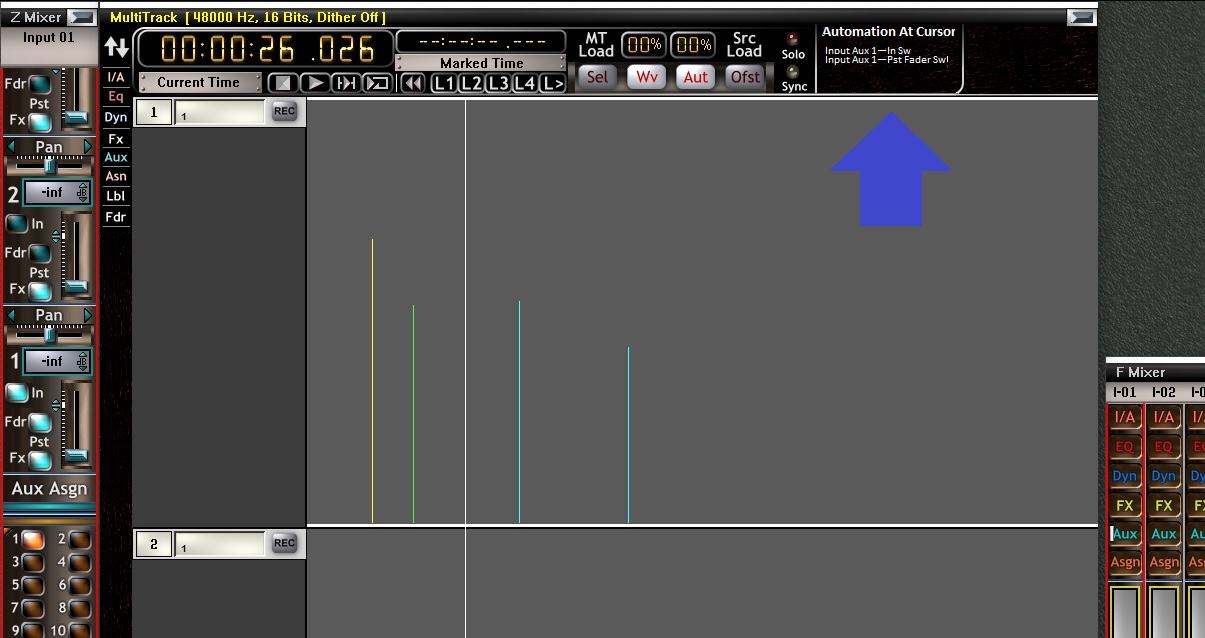
- Automation At Cursor Ideation.jpg (152.67 KiB) Viewed 47332 times
Maybe the display only comes on when we enter Automation Mode. Or maybe that's a user-defined preference. The cool thing is, as I may have mentioned, when you click on an entry (or two?), it filters the MT display for that type(s).

I mean, the thing that would help me the most at this stage is a toggle for groups of VST wrappers to display or hide. Maybe there is a way that I haven't realized. I need about 8 VST wrappers open and show/ hide of those is so time consuming I use other means to view full mixer.
This is gonna sound crazy, but I asked AI if there was a way, and it maybe hallucinating, but here ya go:
The absolute best way to open a specific group of VST plug-ins simultaneously in SAWStudio is by using the Control Track feature.While F-Key views only track native windows, a Control Track allows you to record and trigger exact window-open commands using MIDI or internal automation commands.How to Set Up a Plugin Macro via Control TrackActivate the Control Track: Go to the top menu and select Options > Control Track > Active to turn the feature on.Open the Control Track Window: Select View > Control Track to open its dedicated timeline interface.Record the Open Commands:Place the playback cursor at a specific timeline spot (e.g., bar 1).Click Record on the Control Track.Open the specific VST plugin interfaces you want from your mixer or track patch windows.SAWStudio will write an automation entry for each interface you open.Hit Stop.Trigger the Group: Whenever you navigate the cursor to that specific timeline spot or trigger that automation marker, all chosen plugins will snap open instantly.
[quote="Todd R" post_id=225967 time=1782039817 user_id=60124]
[quote="Dave Labrecque" post_id=225966 time=1781963890 user_id=44]
Am I right in thinking that the only reason to separate them would be to see them and know that they're there? It doesn't limit one's ability to individually tweak them if they're all on top of each other, right? I've found[i] Snapshot Chan Settings to MT Automation [/i] pretty handy at times.[/quote]
I don't know this...need to read up and try[/quote]
FYI, another approach would be to drag the cursor over the cluster of automation entries and watch the Wide Mixer to see which controls move. And if nothing moves, and you want it to, move it! Either there's an entry there already that doesn't actually change the prior value (and you can now change it), or there's no such entry there yet (and you can now add one). IOW, no need to separate them, really. Unless you need to do more than a simple tweak.
More on the Snapshot function below (or above, I guess, depending on how you have your forum view set up).
[quote][quote="Dave Labrecque" post_id=225966 time=1781963890 user_id=44]In that case, it would be cool to have some kind of indicator to reveal what types are at any cursor location. It would seem cleaner than keeping them apart, zooming to see the detail, etc. Of course the current answer to revealing what's there is to use the view filter, which is not so quick, BUT is required if one wants to pick a type to fade to, for example. It'd be cool to look at the "automation at cursor" display and simply select the one of interest in that case. Quicker and easier than perusing the view filter. Or keeping them separated in the first place.[/quote]
You mean more specific than Full Mixer which at least gives an at a glance which params are automated?[/quote]
Yes. The Full Mixer doesn't really show much detail. Fade, solo, mute, whether the various channel strip modules are on line. The Wide Mixer shows all the details (save for plugin-in automation specifics), but it's still kind of an indirect way to zero in on a particular parameter. I'm envisioning a simple display—say, to the right of the Solo and Sync lights in the MT display panel—that lists whatever automation types are represented by an entry at the cursor position. You look at the top of the MT, which you're already working in, and you see what you got. You want to work with/see just one or two of those? Click it/them. And the filter is engaged.
[quote]Dave, what would you want? The same as the automation view filter contextual pop-up with checks for every automated param? The unused params greyed out?
Cuz as it stands, the top most param in the list gets a single check mark in the AVFCM (automation view filter contextual menu) depending upon which param has been automated. The params shown are [i]in order[/i] (from top to bottom) of the available params in the AVFCM depending upon channel designation and the params below whatever the top most param that is automated are not displayed.
Yeah, I use the full mixer for this view at a glance and obviously the Z-Mixer for specific param settings.[/quote]
I was thinking something like this:
[attachment=0]Automation At Cursor Ideation.jpg[/attachment]
Maybe the display only comes on when we enter Automation Mode. Or maybe that's a user-defined preference. The cool thing is, as I may have mentioned, when you click on an entry (or two?), it filters the MT display for that type(s). :cool:
[quote]I mean, the thing that would help me the most at this stage is a toggle for groups of VST wrappers to display or hide. Maybe there is a way that I haven't realized. I need about 8 VST wrappers open and show/ hide of those is so time consuming I use other means to view full mixer.
[/quote]
This is gonna sound crazy, but I asked AI if there was a way, and it maybe hallucinating, but here ya go:
[quote][i]The absolute best way to open a specific group of VST plug-ins simultaneously in SAWStudio is by using the Control Track feature.While F-Key views only track native windows, a Control Track allows you to record and trigger exact window-open commands using MIDI or internal automation commands.How to Set Up a Plugin Macro via Control TrackActivate the Control Track: Go to the top menu and select Options > Control Track > Active to turn the feature on.Open the Control Track Window: Select View > Control Track to open its dedicated timeline interface.Record the Open Commands:Place the playback cursor at a specific timeline spot (e.g., bar 1).Click Record on the Control Track.Open the specific VST plugin interfaces you want from your mixer or track patch windows.SAWStudio will write an automation entry for each interface you open.Hit Stop.Trigger the Group: Whenever you navigate the cursor to that specific timeline spot or trigger that automation marker, all chosen plugins will snap open instantly.[/i][/quote]
